How CENTURY is empowering teachers to generate high quality activities
Estimated reading time: 3 minutes
Last week, we shared how we make sure TeacherGENie (now Worksheet GENai) is accurate when generating questions. This week we wanted to tell you why we created our generative AI feature, TeacherGENie (Worksheet GENai), as well as how it can empower teachers in the classroom.
Many teachers are using the power of generative AI to provide activities to learners, but can it be relied upon to make high-quality resources that not only set the foundations for the lesson, but also take into account students’ prior knowledge? Existing tools have been trained on large data sets and can create text, image and video outputs but these often need improving by teachers using a series of prompts to make sure they are relevant. This makes using generative AI more of an art than a science that requires already time-poor teachers to upskill in another area.
CENTURY Tech has always been at the forefront of artificial intelligence and making sure it is embedded into the core of the platform. By integrating OpenAI into the platform alongside our teacher-made, quality resources, teachers can now instantly generate printable activities on the topic of their choice. The TeacherGENie (Worksheet GENai) feature makes generative AI accessible, instantly creating activities by harnessing our data to make sure they are pitched correctly for learners.
The tool is currently in the beta stage, meaning we are still developing the process used to generate the activities. In order to ensure the feature is as useful as possible for teachers, we showcased it at one of our Ambassador events in June. This was an opportunity to make sure the user journey is as smooth as possible and also inform future developments. You will also be able to give us feedback on the feature when you regenerate a question, which will be used to improve future outputs.
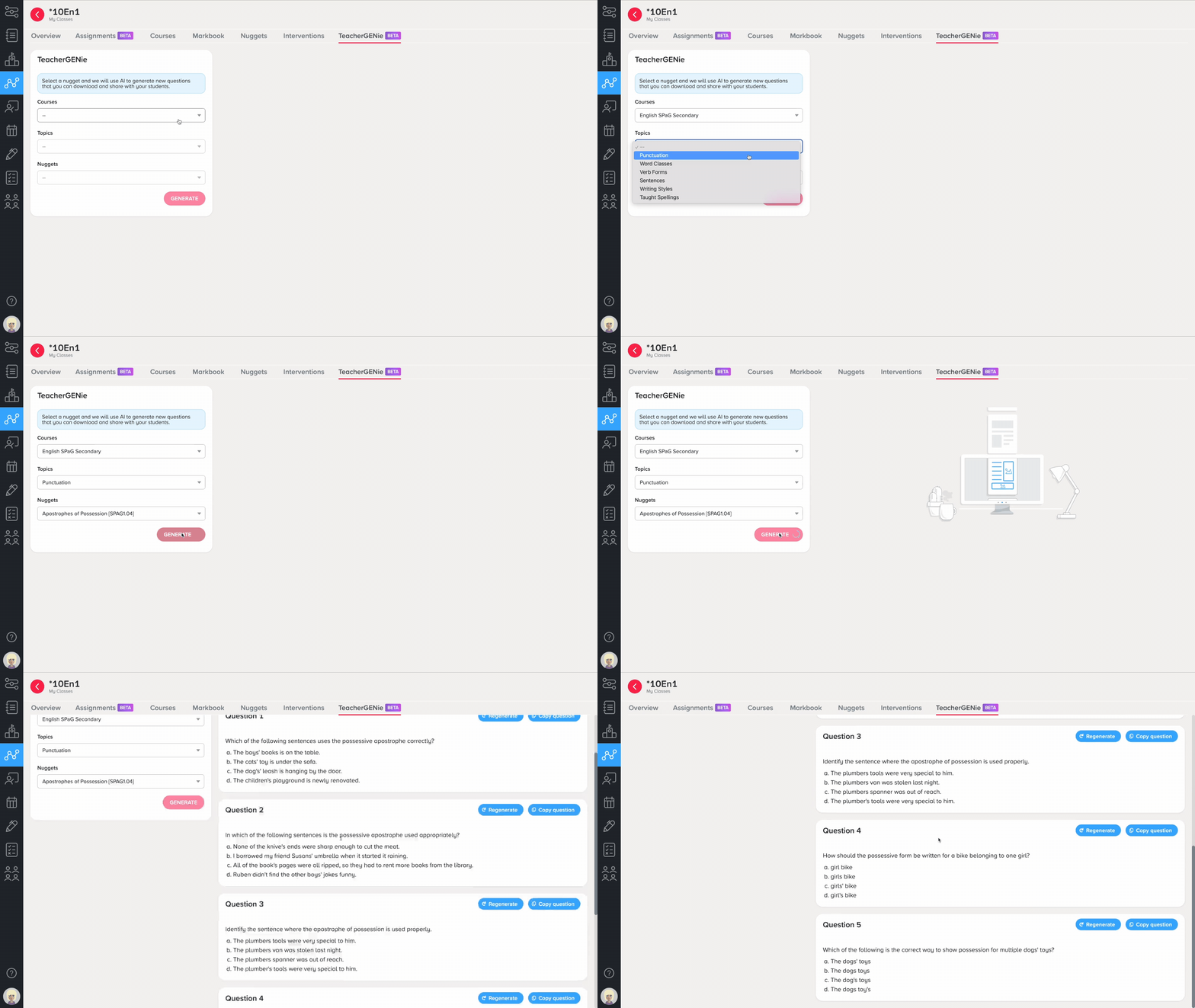
How can you use TeacherGENie (Worksheet GENai)?
These worksheets, consisting of five questions, can be used in class as a starter to assess prior knowledge, as a plenary to check learning, or as part of home learning. The questions can also form part of repeated practice, acting as a great revision tool in the run up to exams. The feature also contains a ‘Copy question’ button to allow you to easily copy and paste the generated content into your slideshow presentation.
Which subjects have TeacherGENie (Worksheet GENai) enabled?
TeacherGENie (Worksheet GENai) is available in beta for secondary English with PE courses, primary English and science and FE English and Digital Skills coming soon. We are looking to roll out to other subjects over the next few months, collecting user feedback along the way.
How can I access TeacherGENie (Worksheet GENai)?
To start generating intelligent activities for your lessons, access TeacherGENie (Worksheet GENai) through the Teacher Dashboard. Worksheets are provided in an editable format for easy customisation and use in class.
To learn more about TeacherGENie (Worksheet GENai) and other CENTURY features, book a demo here. Look out for more details about Ambassador Network in the coming weeks.
CENTURY in the news
View all News
-

Blog
22nd September 2026
Belonging is part of the attainment story
New DfE research finds that pupils who feel they belong at school score, on average, almost a full GCSE grade higher across their results than those who don't. Here's what the findings mean for schools and colleges already tracking wellbeing.
Read more
-

Case studies
16th September 2026
Turning Assessment Data into Curriculum Intelligence at GEMS Winchester School Dubai
When regional disruption threatened Term 3 assessments in spring 2026, GEMS Winchester School Dubai worked with CENTURY to turn assessment data into curriculum intelligence, informing teaching decisions within hours rather than weeks.
Read more